
A clear breakdown of what you’re paying for and what happens if you take parts of it out.
AV quotes can be difficult to understand. It’s only when you start planning the detail that the gaps appear.
“All we need is a mic and a screen.”
It’s one of the most common phrases we hear at the start of event planning, and one of the biggest red flags.
What clients are trying to achieve is simple enough:
- Play walk-on music
- Run a few videos
- Switch slides smoothly
- Make sure speakers look and sound professional
What sits behind that is more involved. That’s where frustration, budget cuts, and last-minute compromises start to creep in.
AV is often seen as a cost line to manage rather than part of how the event runs. It’s usually one of the first areas people question. “Why do we need all these people?” comes up often.
Reducing it doesn’t remove the pressure. It moves it onto your speakers, your agenda, and how the event is experienced on the day.


AV isn’t just equipment. It’s execution
In life sciences events, you’re speaking to an audience used to precision. The content is detailed, the scrutiny is high, and visible mistakes stand out immediately.
AV can look like hiring kit. In practice, it’s people running a live setup.
When an AV quote includes items you don’t recognise, it’s easy to remove them. The problem is that those roles are there to deal with what actually happens during an event.
And things do happen.
Slides change last minute. Speakers run over. Videos don’t play as expected. Panels shift direction. Someone struggles with a microphone.
That’s normal.
So the real question is simple: when something changes, who is there to deal with it?
What you’ll usually see in an AV quote
Most AV quotes come down to two things: the people running the event, and the equipment they’re working with.
Both matter. One doesn’t work without the other.
AV technician / Lead technician
This is the person responsible for the overall setup, operation, and stability of the event. On smaller events, this might be one technician doing everything. On larger events, the lead technician oversees the team and acts as the main point of contact for the client. They handle system setup (sound, screens, lighting), technical troubleshooting and ensures everything runs as designed.

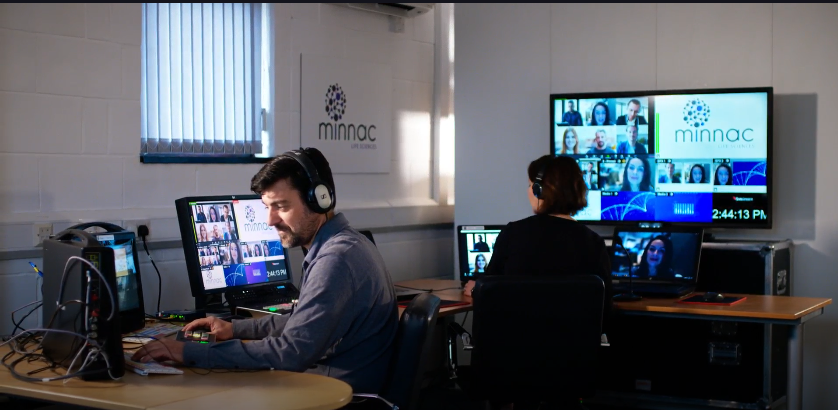
Playback & Graphics operators
These roles control what the audience sees and hears on screen, but they focus on different types of content.
Graphics operator: manages presentation content (slides, titles, timers), ensuring everything displays correctly and transitions smoothly between speakers.
Playback operator: handles all media outside of slides (video, audio, walk-on music), using dedicated systems to ensure it plays reliably and at the right quality.
In simple terms: if your event is slides only, you need graphics. As soon as you introduce lots of video or audio outside of PowerPoint, you need playback.
Lighting operator
This is the person who manages how the stage and speakers are lit.
This affects more than how things look. It affects how speakers come across, especially on camera. And it often needs adjusting as people move or the format changes.

Sound (and why there are usually two people)
Sound is one of the most technical, high-risk parts of a live event — and also one of the easiest to underestimate, because when it’s done well, nobody notices it.
You’ll usually see two roles: A1 and A2.
A1 (lead sound engineer)
Sits at the desk and manages everything the audience hears. They control:
- Microphone levels (lapels, handhelds, lecterns)
- Walk-on music + video audio
- Panel balance across multiple speakers
- Feedback prevention and signal routing
- The sound desk (audio mixer)
In short, the A1 ensures your event sounds professional and controlled.
A2 (audio technician)
Works on and around the stage. Fitting microphones, swapping mics during Q&A, fixing issues as they happen.
Most audio problems don’t happen at the desk. They happen on stage.
If one person is trying to cover both roles, something slips. Either the sound mix suffers, or speakers don’t get support when they need it.

Other items you’ll often see on a quote
Show caller
Often misunderstood or cut entirely, the show caller is the conductor of the event. They cue speakers, lighting changes, video playback, and transitions so everything happens at the right moment. For high-profile or tightly timed agendas, this role is what keeps the event feeling polished rather than chaotic. You’ll often see AV quotes note “client to provide producer / show caller” meaning this responsibility hasn’t been included in the cost. If no one is assigned to this role, those cues don’t disappear, they just become inconsistent or missed.
Technical director / Vision mixer
This is the person controlling what actually goes to screen when there are multiple inputs (slides, videos, cameras, different laptops). They switch between sources seamlessly and ensure the audience only sees what they’re supposed to, and not desktop screens, cable swaps, or delays. Without them, transitions become clunky, screens flicker, and the event quickly feels unpolished. Crucial for complex events!
Stage lighting
This isn’t about aesthetics — it’s about visibility and credibility. Proper stage lighting ensures speakers are clearly seen by both in-room and virtual audiences. Poor lighting can make even the most senior speaker look unprepared or unprofessional on camera.
Confidence monitor
A screen facing the speaker showing slides, notes, or timing. Take it away and speakers start turning around, losing their place, or rushing. But if speakers need to see notes or presenter view, this requires a more advanced setup with additional routing and equipment to show different content to the speaker and audience.
Speaker timer
A visible countdown clock showing speakers how much time they have left. It helps keep talks on time without needing interruptions or guesswork. Without it, speakers tend to overrun or rush, which impacts the flow of the agenda.
Each of these supports how the event runs on the day. Removing them might reduce cost, but it increases the likelihood of visible issues on the day.
What you actually need (vs what gives you flexibility)
Not every role or piece of equipment is required for every event. What’s needed should be driven by what’s happening on the day.
- If you’re only showing slides = you don’t need playback
- If you’re using house lighting = you don’t need a lighting operator
- If there’s only one input (slides only) = you don’t need a switcher
- If you’re only playing a single, simple video = it may be fine embedded within PowerPoint
Larger crews and more complex setups aren’t there for the sake of it, they’re there to allow flexibility, speed, and control when things change. If your agenda is fixed, simple, and you’re clear on the limitations, you can absolutely scale things back.
When things go wrong
Problems tend to happen when the setup doesn’t match the reality of the event. Or when flexibility has been removed but expectations haven’t, such as when AV budgets are reduced late in the planning process, after the agenda and content are already set.
For example:
- Remove the confidence monitor and your CEO struggles to stay on script.
- One technician covering everything so slides, sound, and video compete for attention, and small issues get missed.
- No playback operator means videos are run through PowerPoint, which can lag, lose audio, or fail to play properly
- No switcher / vision mixer → when laptops are changed, the audience sees black screens, desktops, or cable swaps
These aren’t “nice-to-have” features, they are safeguards. When they’re removed, the risk doesn’t disappear; it simply shows up live, in front of your audience.


What that actually costs
Cuts are usually made to protect budget and yet the impact shows up during delivery. They can undermine the very thing you’re investing in: your message.
If a scientific talk is disrupted by technical issues, the audience doesn’t separate the content from the execution. They experience it as one — and judge accordingly.
How Minnac brings clarity to quotes
At Minnac, we don’t treat AV as a black box or a line item to negotiate down by default. We act as your translator and advocate, bridging the gap between what you want your audience to experience and what’s technically required to deliver it.
We help by:
- Breaking down complex AV quotes into clear, plain language
- Challenging unnecessary spend and defending what’s essential
- Aligning technical decisions to your agenda, speakers, and audience
- Planning early so budgets are intentional, not reactive
With Minnac, AV planning becomes proactive rather than reactive. That means fewer last-minute cuts, fewer surprises onsite, and an event experience that supports — rather than distracts from — your scientific and strategic goals.
AV isn’t just a list of equipment. It’s how your event runs in real time.
When it works, no one notices and that’s exactly what you want!